發表文章

Widgets in Windows Mobile 6.5 - 簡介
圖片
Note:本篇是基於下列MSDN以及Windows Mobile Team blog參考資料所做, 如有錯誤或補充的部分歡迎大家提出;文中所列相關程式碼是基於參考資料中所列,希望有助於大家能夠初步的認識Widgets. 參考資料: Developing Widgets for Windows Mobile 6.5 http://msdn.microsoft.com/en-us/library/dd721906.aspx Getting Started with Widgets on Windows Mobile 6.5 http://blogs.msdn.com/windowsmobile/archive/2009/06/04/getting-started-with-widgets-on-windows-mobile-6-5.aspx Widgets 顧名思義,他是一個小工具,在Windows Mobile 6.5所中新增的功能;Widgets也是依附在瀏覽器上面執行的,Widgets能夠在Mobile系統上順利的運作這要歸功於Internet Explorer Mobile 6,沒記錯的話Internet Explorer Mobile 6是基於IE6的核心下去修改、實作的,所以Internet Explorer Mobile 6包含了更多的功能以及更好的使用者經驗,下面這篇文章有一些有關Internet Explorer Mobile 6的相關資料,有興趣的朋友可以參考看看 Internet Explorer Mobile 6 那麼Widgets在Windows Mobile上是扮演什麼樣的角色呢?首先有幾個重點部分 Widgets是以HTML做為介面(外觀)的主體 Widgets支援使用CSS樣式來豐富介面(外觀) 是以JavaScript做為撰寫的語言,也支援了AJAX的功能 所以,對於以往有過Web開發經驗的程式開發人員,都能夠很快的上手Widgets的開發。有個部分要特別提一下,對於以往在Mobile上的Web服務或是應用程式Widgets的優點是什麼呢?Widgets主要的優勢就是上面提到的幾點了,介面需要用到圖片、CSS設定等等,都可以事先放在Client端(Mobile裝置),不需要全部都從網路下載,那麼相信可以減少可觀的封包數量,不僅僅加快速...
Creating a Shortcut File(windows ce)

圖片
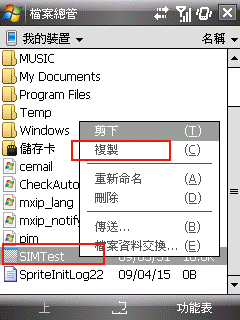
在Mobile裡面有一些好用的軟體可以幫你歸類你安裝過的程式,甚至在Today幫你建立捷徑等等,但是在選擇程式時是有限制的,不能夠用直接指定路徑的方式來跑,那如果是自己做的一些小程式怎麼辦呢? 這時候我們就需要做一個捷徑,之後放到"「開始」功能表"-->"程式集"裡面,這樣一來就可以選擇到我們的程式了。那麼,我們該如何幫程式建立一個捷徑呢? 首先找到你要的程式,之後點住他不放(也就是右鍵的意思),之後點選"複製",像是下圖這樣 完成之後在空白的地方點住銀幕不放(右鍵的意思),之後選擇貼上捷徑,下是下圖 之後你就會看到捷徑產生了,像是下圖這樣 最後就是把產生出來的捷徑剪下來,之後貼到"「開始」功能表"-->"程式集"裡面,這樣就可以選到我們的程式了 那麼,這個捷徑如果想要自己做行不行呢?捷徑檔案裡面的內容又是什麼呢?答案是可以的,我們參考MSDN上面這篇 Creating a Shortcut File 就可以製作出來了,下面我再簡單說明一下實作的方式 在電腦上建立一個文字檔(txt檔案),因為是要做成捷徑,名稱可以取跟你的程式一樣的名稱 輸入檔案內容 檔案內容的部分會像是下面這樣 36#"\Program files\SIMTest\SIMTest.exe" 36是表示在#號後面總共有幾個字,而#號是用來分割路徑以及字數的,#號就是你實際程式擺放的位置跟檔案名稱了,要特別注意的是如果路徑中帶有"空白"的話,就要像範例這樣子,用"雙引號"把整個路徑包起來才行 再來儲存檔案之後把副檔名修改為lnk之後複製到裝置上就可以使用了

Windows Mobile Resources

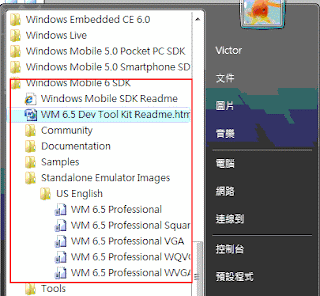
Windows Mobile 5(for Visual Studio 2005,If you are using VS2008,you don't need install again.) Windows Mobile 5.0 SDK for Pocket PC Windows Mobile 5.0 SDK for Smartphone Windows Mobile 6 Windows Mobile 6 Professional and Standard Software Development Kits Refresh The Windows Mobile 6 SDK Refresh adds documentation, sample code, header and library files, emulator images and tools to Visual Studio that let you build applications for Windows Mobile 6. Windows Mobile 6 Localized Emulator Images This package includes localized Windows Mobile 6 emulator images that can be used with Visual Studio to test applications on different localizations or simply as standalone emulators without Visual Studio. Windows Mobile 6.5 Windows Mobile 6.5 Developer Tool Kit SDK, DTK, DRK: WTF?! Getting started with widgets on Windows Mobile 6.5 Developing Widgets for Windows Mobile 6.5 Widgets 1.0: Packaging and Configuration SQL Server COmpact Edition(sqlce) Microsoft SQL Server Compact 3.5 Service Pack 1 ...

Windows Server 2008 & Vista SP2 released to web

有訂閱MSDN或是TechNet的朋友,現在Vista & Server 2008 SP2已經可以下載了,不過Vista的部分要留意一下,這次的SP2是沒有包含SP1更新的部分,所以必須要安裝SP1之後才能安裝SP2,詳情請參考下面網頁中的說明吧 適用於 Windows Server 2008 和 Windows Vista 的 Service Pack 2

Windows 7 Release Candidate

下一個Windows作業系統Windows 7現在已經進入RC的階段了,想要下載來玩玩看嗎?請到下面相關位置參考看看,但是目前還沒有繁中的版本喔 Windows 7 Release Candidate http://technet.microsoft.com/en-us/evalcenter/dd353205.aspx?ITPID=mscomsl

VS2010 Beta1

VS2010 Beta1已經出爐了,有興趣的朋友可以前往下面網站參考 Visual Studio 2010 and .NET Framework 4 Beta 1 http://msdn.microsoft.com/en-us/vstudio/dd582936.aspx

Windows Mobile Code Samples

這篇單純做備忘用,有興趣的朋友也可以參考看看。 在MSDN上面有Windows Mobile Code Sample相關的資訊可以參考(必須安裝SDK) http://msdn.microsoft.com/en-us/library/ms879577.aspx